Blogs
Transparency in Coverage Final Rule (2026): What Changes for Payer Machine-Readable Files
Payers will report by network instead of plan, move from monthly to quarterly, and attest to their data. We expect files to be slimmed down, more organized, and easier to find online.
On October 5, the Treasury, Labor, and HHS (the Departments) jointly finalized the biggest update to the Transparency in Coverage (TiC) rules since the original payer machine-readable files (MRFs) came online in July 2022. CMS largely viewed this final rule as a chance to address three specific problems stemming from the original 2020 TiC final rule. These problems are well known and persistent as Turquoise and many others have observed over the years of parsing and mining payer rate data.
Broadly:
- Payer MRFs started out too massive to be immediately useful
- The rates within payer MRFs often lacked the context needed to correctly interpret the data, and
- Payer MRFs didn't line up well enough with hospital MRFs governed by the Hospital Price Transparency (HPT) final rules to effectively and consistently create apples-to-apples rate comparisons to confirm rates were accurate.
These new TiC requirements are big news, and the Turquoise team is excited to see a lot of the themes we wrote about in our proposed rule public comment come to fruition in the final rule. At a high level, we believe the new Final Rule will act as a real solution to the problems mentioned above. Particularly if payers are held accountable to the same file quality, completeness, and accuracy standards as hospitals, we anticipate more manageable and meaningful payer MRFs once the new requirements are in effect. Perhaps we'll even be able to render our CTO, Adam's, blog on parsing a petabyte of data in the Turquoise platform (somewhat) obsolete!
Let's dig into the final rule specifics to see why that could be the case.
Newfound clarity in naming conventions, definitions, and reporting
The final rule did a noticeable amount of housekeeping for what specific rates should be included in the files and how those rates should be tied to insurers, networks, and plans.
For example, the Departments finalized four categories, individual, large group, small group, and self-insured, to define the health insurance market and added cross-references to the excepted benefits definition for clarity. They also further defined network-level reporting to ensure all negotiated rates are present within the file, regardless of network name:
"Each network should represent a single collection of contracted providers and corresponding in-network rates within a defined structure... If variations among either participating providers or in-network rates exist, those variations constitute a separate network (for example, a derived network...)."
That "single collection" element of the definition is helpful for ensuring rates appear in MRFs once, not multiple times, which should eliminate some duplicative data. As a result, a network, which is now understood to be a collection of providers and rates, becomes a very distinct unit in the context of an MRF.
Another area of feedback we documented in our public comment was related to network names. Specifically, we observed higher utility in files from payers reporting the more commonplace external, consumer-facing marketing name rather than an internal mnemonic. The final rule finalized that naming convention by saying the common provider network name "should be an external name most familiar to participants, beneficiaries, enrollees, and the public." To further solidify this more organized approach, the Departments also added a required provider network identifier alongside the name, which addresses broader name ambiguity concerns that plague current files.
Why does this matter? It's very common for multiple plans from the same issuer to utilize the same provider network and the same negotiated rates. Thus, reporting at the network level instead of the plan level should meaningfully shrink both the number and the size of In-network Rate (INR) Files. Currently, there is redundancy for files posted at a plan level because many plans share networks. If an INR file is representative of a network, you can utilize the Table of Contents file as a mechanism to attach a single INR network file to multiple plans.
From a size perspective, this should also in theory (hopefully) mean that only a single network is reflected in an INR file. The new requirements remove some ambiguity and layering within files.
Put simply, we'll expect to have a singular rate reported one time, not a singular rate reported half a dozen or a dozen times at the plan level.
It also explicitly aligns MRF rate reporting requirements across payer and hospital MRFs. This convergence of standards will only benefit the industry. We expect most payers to shift toward a one-network-per-file structure where applicable, and that alone should make it a lot easier to figure out what network and plan a given set of rates represents.
The product names debate continues
The final rule addresses an ongoing question regarding MRF plan vs network by defining product type as "a coverage option designation rather than a network-level designation," with HMO and PPO called out as illustrative, non-exhaustive examples that self-insured plans commonly also use. There's more to come on this topic, and ideally future clarification will include confirmation if the product type should live at the TOC level or elsewhere:
"The Departments intend to develop future technical implementation guidance that will allow plans and issuers to select from a list of common product types and determine an alternative for reporting if there is no common product type to accurately describe the benefit offering."
Still pushing for a mandatory Table of Contents file
We've been vocal about wanting a mandatory table of contents (TOC) file, and though the final rule declined to require it this time around, we'll continue to ask for it in forthcoming public comments. The good news is most payers already use a TOC file today, but a provision specifically for the long tail of MRF teams that don't create one is what didn't get adopted in rule.
Based on our understanding, the final rule updates create ambiguity in how the TOC File interacts with the INR File, and we're still trying to untangle that. The rule says the TOC File is expected (not required) when multiple plans share the same network and rates. It also says that going forward, INR Files should only contain contracted providers and their rates, with everything plan-specific, such as HIOS, EIN, and group number, pushed into the TOC File. Read one way, that's just the status quo: TOC stays optional, and INR Files keep their existing header fields, just populated or left blank as applicable. Read another way, the final rule suggests going forward, those identifier fields may not belong in the INR Files at all. Either interpretation lands us on the same open question: if the TOC File isn't required, what happens to that plan-level identifying information for networks that don't use one?
The final rule offered GitHub as a place for clarifying questions, and we'll be submitting one in this topic. More to come!
Updates concerning dollar amount rates, algorithms, and outlier/stop loss reporting
Moving away from file organization and structure, these elements impact the way certain negotiated rate types appear within MRFs. Because contracts are incredibly complex, relying on MRFs alone to impute actual rates can be a challenge, and we hoped for slightly beefier requirements since we believe MRFs are foundational to creating accurate upfront patient cost calculators.
Percent of charge rates are not required to include any kind of estimated allowed amount, which differs from the percentile allowed amount reporting in HPT. Algorithm-based rates can be further defined using the optional additional information open-text field in the schema so plans can describe payment formulas or methodologies that don't fit the standard fields. Experience has shown that anything optional is not nearly as effective as a requirement, so the burden to derive a dollar value based on this lack of updates remains on the MRF user, not the MRF creator.
Most notably, the need for stop loss and outlier rate disclosure remains outstanding. The Departments acknowledged the lack of disclosure as a substantial gap and committed to addressing these provisions in Schema 3.0. So while it's not adopted yet, it's explicitly teed up. We'll be tuned in for updates there, the same as we are for stop loss and outlier reporting in hospital MRFs.
Moving from monthly to a quarterly reporting cadence
As anticipated, payers move from monthly to quarterly reporting for the INR and Allowed Amount Files. The reasoning in the final rule tracks what we've heard from payers and what we've experienced ourselves: networks and rates don't move much month to month, so a quarterly cadence shouldn't meaningfully reduce the usefulness of the data. Our hope is the new cadence also buys file users more time to actually ingest it before the next drop, which means more time engaging with meaningful data and less time parsing noisy data. Hospitals only update their files annually, so the monthly vs annually cadence sometimes caused rate mismatches between files. We anticipate that will still exist on a quarterly vs annual cadence, but less frequently.
Allowed amount file changes
A handful of changes stack up that should result in a bigger swath of claims data for reporting. First, the claims threshold dropped from 20 to 11, and second, the reporting period got extended to 6 months with a 9-month lookback. Data will be aggregated at the health insurance market level instead of the plan level, and the Departments clarified the threshold applies per item or service, not per provider.
The Departments frame all four of these changes as working collectively to meaningfully increase how much usable out-of-network data actually shows up in these files.
Taxonomy file and provider rate exclusion
Remember all those references over the years to clinically plausible rates? Good news: they should finally be disappearing, which has massive file size implications. The Departments broadened the requirement beyond a formal internal provider taxonomy to include "other internal rules" to help plans map billing codes to specialties. NUCC remains the baseline code set, and when paired with confirmation that payments exist in the Utilization File (more on this later in the blog, but in short, we're anxious to see how CMS implements these requirements through schema. Find our live thoughts on GitHub!), this should help confirm that the rates showing up in an MRF are actually plausible and not just technically present on a massive, wide-ranging fee schedule. Functionally, this means a payer should no longer report instances like a podiatrist with a negotiated rate for heart surgery because it's not compliant for payers to report contract rates covering "every provider in the organization."
High level, the takeaway here is that the providers reported alongside the rates in the MRFs must pass an element of a common sense test. Would this provider administer this item or service? If not, there's no place for it in a file.
Text file and increased leadership accountability
The standardized root folder text file was finalized as proposed, and it now extends to the future prescription drug file, too. Where HPT requires a specific point of contact, the TiC final rule allows a monitored group email address instead of a named individual for the government to contact a payer MRF generation team. This brings TiC closer to parity with HPT requirements, should make files easier to locate, and we hope it meaningfully helps enforcement efforts, too.
Speaking of HPT, there's also a new attestation requirement for payers. Plans and issuers must attest that the data is true, accurate, and complete to the best of their knowledge in each INR, Allowed Amount, Taxonomy, and Utilization file. This is another element of accountability that indicates the government may be taking compliance and enforcement more seriously in the coming months.
JSON is now the single format for MRFs
It's all JSON, all the time in the final rules. Going forward, JSON will be the singular required format for every MRF except the plain-text file, which stays a .TXT by design. The overwhelming majority of files we encounter are already JSON, so this should be a minimally invasive change that addresses the long tail of different file types that are more burdensome to parse and organize.
No CAPTCHAs, throttling, or access barriers allowed
Some good housekeeping here, which was finalized as proposed. CAPTCHA challenges, 403 errors, and download limits are now all forbidden in the pursuit of ensuring payer MRFs are accessible. Anyone interested in finding and downloading payer MRFs can and should be able to do so.
Elements mentioned in the proposed rule, not finalized
- Enrollment totals: We advocated for including enrollment totals so file users could better understand which networks carry the highest member volumes, but the Departments declined to move forward with it.
- Change-log file: The Departments noted this would be burdensome, based on public comments, and declined to finalize it.
- Government-led API for rates: Still just a future plan, which is how it was introduced in the proposed rule as well. We anticipate more organizations will use their own APIs for rates.
- Utilization file, with a caveat: The Departments finalized the Utilization File, but kept it as a binary reimbursed-or-not indicator rather than actual claims volume. So the binary file still exists. The implication? A binary file is sufficient to answer "Did provider X actually furnish service Y during a given period?" That should meaningfully improve plausibility checks on the data, although we would have preferred the actual claims volume to help better understand rate changes and financial implications across the data sets.
TiC applicability timeline
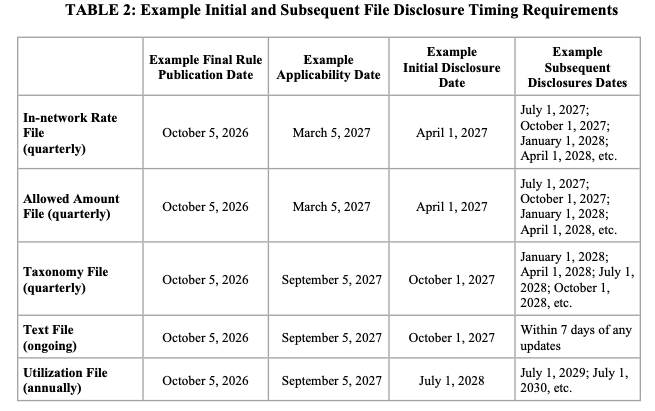
This one requires your thinking cap. The rule itself is effective 60 days after publication in the Federal Register, which is different from when specific provisions actually have to be followed. The INR and Allowed Amount File changes apply 5 months after publication. The new contextual files, Taxonomy, Utilization, and the text file are enforced 11 months after publication. The table below was included in the rule as a point of reference:
Where the real data value is going next
A lot is still riding on the promise of future technical guidance, so we'll be watching GitHub closely as Schema 3.0 takes shape. But in the meantime, we're excited to track how much these new files will shrink and if the data is higher quality, more organized, and not quite so noisy.
Zooming out, these updates signal a subtle yet substantial shift in the way price transparency data will be valued going forward. With the emphasis on more organized, smaller files all designed around access, MRF data will be more available than it's ever been. That availability allows more focus on file quality questions: How accurate is this rate? Has it been validated across other files? Increased trust in MRF rates becomes the harder, more valuable problem to solve.
So how does the industry innovate while pushing the transparency conversation forward? The whole point of price transparency was never just a quest for more data. It's a quest for a consumer-friendly, easily accessible and actionable price. We're here to eliminate the financial complexity of healthcare, which means validating data, building upon it, and holding ourselves and the industry to the standard of actually removing financial uncertainty for patients. This final rule is another step along the path to make that world a reality.

Prescription Drugs Rates Get A Mandated Due Date with Dec 2027 Enforcement
What this means for manufacturers ability to provide patients a personalized OOP cost for drugs

Transparency in Coverage Update Trims Down Payer MRFs & Brings Back the Rx File
CMS's first major TiC overhaul since 2022 simplifies payer files and sets a December 2027 enforcement date for the prescription drug file. Here's what it means for patients and the industry

Turquoise Submits a Response to the CMS CPT Request for Information
TLDR: bring on the era of open license code sets.

Turquoise's Public Comment on CMS-1850-P
We comment on: hospital MRFs and stop-loss, shoppable service selection, and the proposed 340B payment adjustment.

Turquoise Is Now A CMS Qualified Entity
Which means CMS certified us to work with Medicare claims data

We’ve signed CMS’ Health Tech Ecosystem Pledge. Here’s what that means
CMS announced a category focused on conversational AI and personalized estimates and we launched our Consumer Pricing API

CMS’ new guidance puts stop loss on center stage
Celebrating official guidance on how to encode these complex terms into MRFs


No results found
There are no results with this criteria. Try changing your search.